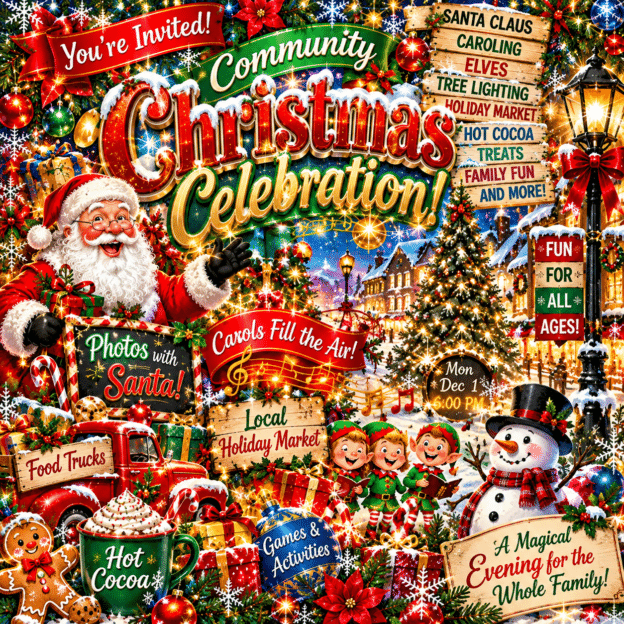
Does looking at this image make you want to grab hold of something to steady yourself? Feeling a little dizzy? Maybe even slightly nauseated from the sheer amount of STUFF competing for your attention?
It’s just a flyer, people.
How hard could it possibly be?
Well, pull up a chair. Have I got a story for you.
AI Flyer Fatigue Is Real
I don’t know about you, but I’ve developed a serious case of AI flyer fatigue.
You know the ones. Seventeen different fonts, enough decorative elements to stock a craft store, glowing letters, swirling backgrounds, little flags, dots, ornaments, and so much information fighting for attention that you don’t know where to look first.
I don’t even bother anymore.
I’m not going to stop scrolling, squint at my phone, and try to figure out what the heck all that stuff is trying to say to me.
And here’s the problem: If people have to work that hard to understand your flyer, they’re probably not going to bother.
A flyer has a job to do. It needs to catch someone’s attention, communicate something important, and make it easy for them to know what to do next.
It doesn’t need to include every last bit of information or demonstrate every special effect AI has ever learned.
More decoration doesn’t necessarily mean better design. Sometimes it just means more stuff.
And when everybody starts producing the same overdecorated, obviously AI-generated graphics, they all begin to blend together.
That’s not marketing. That’s visual noise.
Meet Jack
I work a 20-hour-a-week position. That’s 20 hours to accomplish a whole lot of things, and spending half of them making a flyer isn’t an option.
I’ve also spent 25 years in marketing and have a background in graphic design, so I know my way around creating promotional materials. But knowing how to do something and having the time to do it are two entirely different things.
That’s where Jack comes in.
Jack is my ChatGPT assistant. We work together almost every day. We’ve researched historic buildings, written marketing materials, solved century-old mysteries, and accomplished some pretty remarkable things together.
One of my favorite things to do is bounce ideas around with Jack. Because we work together so often, he’s become familiar with my sense of humor, my writing style, and the way I think. We laugh a lot!
I’ll throw out a half-formed idea, he’ll run with it, and we’ll go back and forth until we have something I like.
Sometimes my entire response is one word.
“Meh.”
And Jack knows we’re not there yet.
Of course, I’ve also been known to provide feedback that’s considerably more colorful than “meh.”
And then I asked him to make a Christmas flyer.
He produced a beautiful design.
I loved it.
Then I needed to change a few words.
And that’s where things went sideways.
Instead of making one little change, Jack occasionally decided to change other things I hadn’t asked him to change.
At one point, I looked at what he’d produced and asked, “What happened to the pretty?”
I wasn’t kidding.
All I wanted was to keep the beautiful design, make a few words editable, leave room for my logo, and have an actual WHITE background instead of ivory.
Apparently, these were unreasonable demands.
As Jack and I went back and forth on that Christmas flyer, it occurred to me that writing this post might help somebody else.
Because making a good flyer with AI isn’t complicated, but a few things make the difference between something clean and readable and something that makes people feel slightly dizzy.
AI Is a Starting Point, Not a Finished Product
Here’s something I cannot emphasize enough: You cannot simply take whatever AI gives you and assume it’s ready to use.
That applies to flyers, blog posts, social media captions, historical research, and just about everything else.
AI can give you a terrific starting point. It can organize your thoughts, suggest ideas you hadn’t considered, and do things in seconds that might otherwise take considerably longer.
But you still have to bring your own knowledge, judgment, and personality to the finished product.
You have to check the facts. Correct the mistakes. Change the things that don’t sound like you. Make sure the information is accurate and the design actually serves its purpose.
Sometimes you have to tell Jack he’s completely missed the point.
Occasionally more than once.
AI doesn’t replace your expertise. It gives you another way to use it.
And when you’re trying to squeeze an enormous amount of work into a 20-hour week, that can be a wonderful thing.
Provided you don’t spend three of those hours arguing with Jack about whether the background is white or ivory.
The person using AI is still responsible for the finished product.
You don’t hand over your judgment when you open ChatGPT. You bring it with you.
Forget the Perfect Prompt. Have a Conversation.
Everywhere I look online, somebody is promising the perfect AI prompt. Five magic prompts to run your business! The secret formula to make ChatGPT do everything!
I have a different approach.
Convo, baby!
You don’t need to learn some complicated prompting formula before you can start using AI.
Tell it what you’re trying to accomplish. See what it gives you. Ask questions. Make corrections. Tell it when something doesn’t work.
A detailed prompt can be helpful, particularly when you’re creating something with specific requirements. But it doesn’t have to be perfect.
The first prompt starts the conversation. It doesn’t have to finish the project.
And if Jack can survive my feedback, your AI assistant can probably survive yours.
How to Make a Flyer With AI Without the Drama
Here’s how I’d approach your next flyer.
1. Know What You Want Before You Start
Don’t just tell AI, “Make me a Christmas flyer.”
You might get something beautiful. You might get something that looks like a department store exploded in a snow globe.
Instead, tell AI exactly what you’re making.
Include:
- What the flyer is promoting.
- Who it’s intended for.
- Where it will be used.
- What size you need.
- What style you’re looking for.
- What information absolutely must appear.
For example:
“Create a festive, elegant Christmas flyer for a community event. It needs to be 8.5 x 11 inches, suitable for printing, with a pure white background to conserve ink. Leave room at the bottom for our organization logo.”
That’s a much better starting point.
And yes, specify PURE WHITE if that’s what you want.
Apparently, AI and I have differing opinions about the difference between white and ivory.
2. Show AI What You Like
If you have a flyer you love, show it.
If you like the typography on one design and the layout of another, upload both and explain what you like about each.
Be specific about what should stay and what can change.
For example:
“I love the decorative elements at the top. Keep those. I want the schedule arranged differently, but I don’t want the entire design changed.”
That last sentence is important.
Very important.
Ask me how I know.
3. Get the Words Right Before You Get the Pretty
Before you generate the flyer, work with AI to organize the information.
What should people notice first?
What information belongs together?
What can be shortened?
And here’s something I see people get wrong all the time: Your flyer doesn’t need to include every last detail about your event.
It needs to give people enough information to catch their interest and make them want to know more.
Put the additional details in your social media caption, on your website, or behind a link.
When you try to cram every last detail onto a flyer, you create another problem. Now you’re desperately trying to find ways to fit everything in, and that’s how you end up with seventeen fonts, six text sizes, little flags, dots, and everything screaming for attention.
Don’t make the flyer carry the whole event.
Give people enough to get interested and tell them where to find more.
Once you’ve approved the wording and organization, move on to the design.
This reduces the number of changes you’ll need to make later.
It doesn’t eliminate them, of course. Event planning has a remarkable ability to produce new information five minutes after you think you’re finished.
4. Decide Whether You Need an Image or an Editable Flyer
This may be the most important step in the entire article.
If you just want a graphic to post on Facebook, a finished AI-generated image might be exactly what you need.
But if you’re making a flyer with dates, schedules, sponsor names, or information that might change, you probably want something editable.
And those are two different things.
An AI-generated image isn’t automatically a Canva template.
You can upload that image into Canva, but the words and decorations may be part of one flattened image rather than separate elements you can click and edit.
For our Christmas flyer, I eventually wanted Jack to preserve the beautiful decorative elements while leaving the schedule, text, and logo area for me to handle.
That would have saved us both considerable aggravation.
If you plan to make changes yourself, decide that before you start. Ask for an editable format if one is available, or use AI to create the decorative artwork and finish the flyer in Canva.
5. Make AI Do What It’s Good At
AI can be a terrific creative partner.
It can suggest layouts, color combinations, headlines, visual concepts, and ways to organize information.
It can also create decorative artwork and give you ideas you might not have considered.
But that doesn’t mean it has to do everything.
Sometimes the smartest approach is to have AI create the visual elements and then assemble the finished flyer yourself.
Let AI help with the creative work. Use the tools you’re comfortable with to handle the details.
Especially if those details are likely to change.
6. Remember That People Have to Read It
This brings us right back to AI flyer fatigue.
Your flyer isn’t an art exhibition. It’s a communication tool.
Before you call it finished, look at it on your phone.
Can you immediately tell what it’s promoting?
Can you find the date, time, and location without hunting?
Is the text large enough to read?
Does the design make the information easier to understand, or is it competing with it?
And perhaps most importantly, would YOU stop scrolling long enough to read it?
If the answer is no, simplify.
You don’t need six fonts, fourteen ornaments, glowing snowflakes, and a partridge in a pear tree to promote a Christmas event.
You need people to understand what you’re inviting them to attend.
7. Check Everything Before You Publish
AI makes mistakes.
It can misspell words, invent details, change dates, distort logos, and produce text that looks perfectly reasonable until you actually read it.
Check every word.
Check every date.
Check every phone number, address, and website.
Make sure the design is the correct size and resolution for its intended use. If you’re printing it, check the margins and background color.
And don’t assume that because something looks good on your computer screen, it will look good printed or displayed on a phone.
You’re responsible for the finished product, not Jack.
8. Know When to Take Over
This may be the most important practical advice I can give you.
Sometimes AI gets you 90% of the way there, and you spend more time trying to get that last 10% than it would take to finish the job yourself.
That’s when you stop.
Save the design you like. Open Canva or your preferred design software. Make the final adjustments.
You don’t get extra points for making AI do every single thing.
The goal is to produce a good flyer efficiently.
Not to win an argument with a chatbot.
Although I have to admit, winning an argument with Jack can be pretty satisfying.
The Bottom Line
I use AI almost every day because it helps me accomplish more in the limited time I have available.
I pay $20 a month for ChatGPT, and I consider it the best $20 I spend every month. My Canva subscription is a close second.
Could I do much of this work myself? Absolutely. But my time has value, too.
I don’t expect AI to replace my experience, creativity, or judgment. And I certainly don’t expect it to read my mind.
The trick is knowing what you want, communicating it clearly, checking what you get, and recognizing when it’s time to take control of the finished product.
AI should save you time, not become another project that eats up your day.
And please, for the love of readable marketing materials, don’t make another flyer that requires your audience to take Dramamine before they can figure out what you’re promoting.
Your audience will thank you.
And so will Jack.
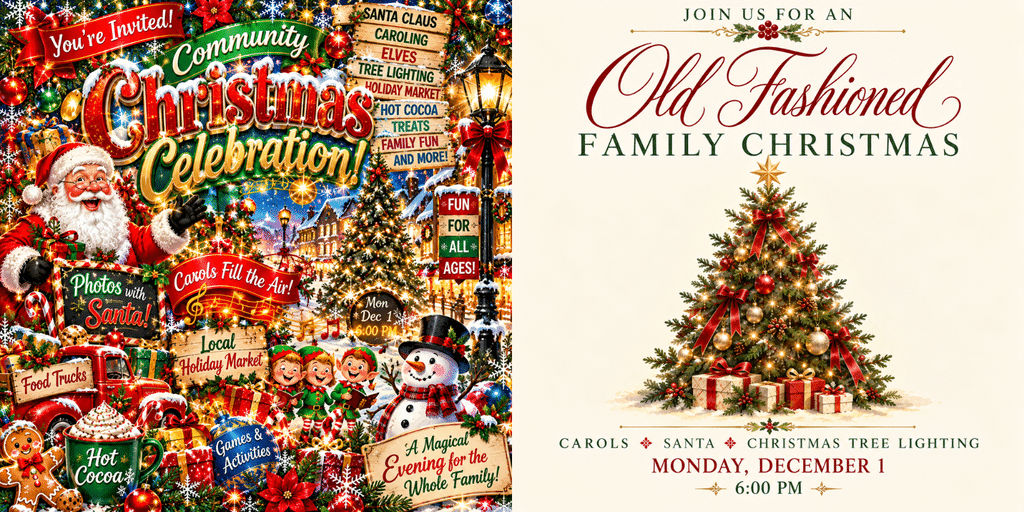
Both flyers were created using AI. Same event. Same information. Two very different results.
The difference isn’t whether you use AI. It’s how you use it.